
The best computer speakers for most desks are the Audioengine A2+ Gen 3 for clear, room-filling stereo or the Edifier R1280DBs if you have space for bookshelf-size speakers. On a budget, the Creative Pebble V3 and Logitech S150 are a big step up from laptop speakers, while the Logitech Z407 and Klipsch ProMedia Lumina add a subwoofer for real bass.
Need a sound upgrade at your desk? Whether you are a gamer, want better Zoom calls or enjoy Spotify jam sessions, you can find great speakers that fit your space and your budget.
Every pick below is sold new as of November 2026. We’ve replaced the models from our earlier list that have been discontinued or are hard to find, and you’ll find a quick buyer’s guide and answers to common questions at the end.
Top PC Speakers
Our top choices for computer speakers are diverse. They range from tiny USB-powered speakers that fit beside a laptop to 2.1 systems with a subwoofer under the desk. Check them out to see which of the best PC speakers has the features that meet your needs.
1. Audioengine A2+ Gen 3
See the A2+ Gen 3 on Audioengine.com
Audioengine A2 desktop speakers have been around for a while, and for good reason. Audioengine tends not to rush things to market, which means its products are solid.
The A2+ Gen 3 is the current version of this compact favorite. It’s an eye-catching set of speakers with impressive clarity and true stereo sound for its size.
Each speaker pairs a 2.75-inch aramid fiber woofer with a 0.75-inch silk dome tweeter. A Class D amplifier delivers 15 watts RMS per channel and 60 watts of total peak power.
This is not a thumping bass product, but there is a subwoofer output if that’s your thing. Audioengine suggests its own S6 sub as a match.
One of the best reasons to buy these speakers is the flexible connectivity. You can connect over USB-C, Bluetooth with aptX Adaptive, a 3.5 mm mini-jack or RCA inputs, so they can easily go beyond your desktop.
The A2+ Gen 3 comes in Hi-Gloss Piano White, Hi-Gloss Red, Matte Black, Matte Green and Limoncello Yellow, so it can match almost any setup.
Since they are small speakers, placement goes a long way. Sitting them flat on your desktop might sacrifice what you hear. Elevate them a bit and angle them toward your ears to get the best audio quality.
Key Features
- 2.75-inch aramid fiber woofers and 0.75-inch silk dome tweeters
- 15W RMS per channel, 60W total peak power
- Bluetooth with aptX Adaptive, aptX HD, aptX, AAC and SBC
- USB-C, 3.5 mm and RCA inputs
- Subwoofer output
- Five finishes
- Clear, detailed stereo sound
- Lots of wired and wireless inputs
- Fun color options
- Premium price for its size
- Limited deep bass without a sub
2. Klipsch ProMedia Lumina 2.1
See the ProMedia Lumina on Klipsch.com
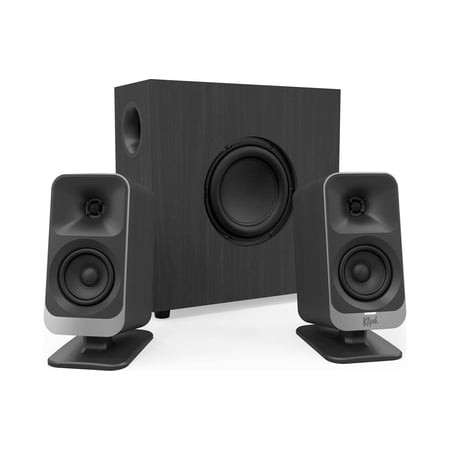
Klipsch is known for creating high-quality audio equipment for home theaters. Its ProMedia 2.1 system, first introduced in 1999, became one of the best-selling computer speakers of all time, and the ProMedia Lumina is its redesigned successor.
The 2.1-channel setup gives you separate left and right satellites plus a low-profile subwoofer that tucks under your desk. The sub has an adjustable gain knob and a cable management design, so it doesn’t take over your floor space.
The technology behind the sound is Klipsch’s MicroTractrix horn tweeters, which deliver pinpoint clarity. That’s handy for editing videos and for hearing footsteps in games.
The cabinets are completely re-envisioned, with tiltable stands that let you aim the sound at your ears. Each satellite has six LEDs with five ambient light modes, and the Klipsch Control desktop app lets you adjust EQ, lighting, night mode and a music react mode.
You can connect over USB-C, AUX or Bluetooth 5.3, so it works with your computer, phone and tablet. It’s a good buy for a panoramic sound experience at your regular or standing desk.
Keep in mind that it’s priced in premium territory, and Klipsch’s own store listed it as backordered when we checked. Retailers like B&H and Crutchfield also carry it.
Key Features
- 2.1 system with low-profile subwoofer
- MicroTractrix horn tweeters
- USB-C, AUX and Bluetooth 5.3 inputs
- Tiltable satellite stands
- LED lighting with five light modes
- Klipsch Control app for EQ, lighting and night mode
- Big bass from a compact sub
- Modern inputs, including USB-C
- App control and customizable lighting
- Costs much more than the original ProMedia 2.1
- Stock can be spotty
3. Creative Pebble V3
See the Pebble V3 on Creative.com
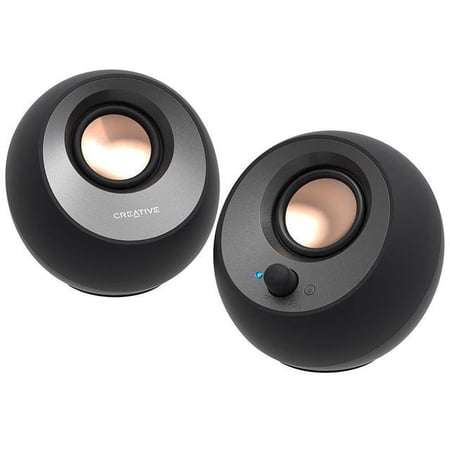
The Creative Pebble V3 replaces the Pebble 2.0 from our earlier list. Besides having a cool, round shape, these speakers deliver impressive sound for their size.
They have a small profile, so they are a good choice if you have limited workspace. Plus, they are among the most affordable ways to upgrade your desk audio.
The 2.25-inch full-range drivers are angled 45 degrees upward, so the sound projects toward your ears as you sit at your desk instead of into your keyboard.
A single USB-C cable carries both power and audio, and Creative includes a USB-C to USB-A converter for older computers. You can also connect over Bluetooth 5.0 or the 3.5 mm AUX input.
Creative rates them at 8 watts RMS and up to 16 watts peak. To get the full output, you’ll need a 10-watt USB-C port or a 5V 2A USB adapter with the gain switch set to High. A Clear Dialog feature also makes voices easier to hear on calls and in videos.
To be clear, these desktop speakers don’t deliver mind-blowing bass. They do offer more volume and depth than your standard laptop speakers, without breaking the bank.
Key Features
- 2.25-inch full-range drivers angled at 45 degrees
- 8W RMS, 16W peak
- USB-C audio and power, USB-A converter included
- Bluetooth 5.0 and 3.5 mm AUX input
- Clear Dialog voice enhancement
- Very affordable
- Tiny footprint
- One-cable USB-C setup
- Needs a strong USB port for full volume
- Light on bass
4. Edifier R1280DBs
See the R1280DBs on Edifier.com
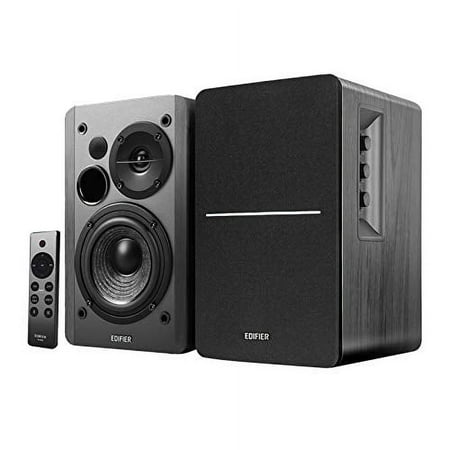
The Edifier R1280DBs takes the place of the Bose Companion 20 from our earlier list. If you have room on your desk, these powered bookshelf speakers deliver a much bigger sound than most computer speakers.
Each speaker has a 4-inch mid-bass driver and a silk dome tweeter, with 42 watts RMS of total power. The wood-look cabinets come in Brown or Black and give off a classic hi-fi vibe.
Connectivity is where they really shine. You get Bluetooth, two RCA inputs, plus optical and coaxial digital inputs, so you can connect your computer, a turntable preamp and even a TV at the same time.
There’s also a subwoofer output if you want more low end later. Volume and tone knobs sit on the side panel, and a remote control is included.
These are larger than a typical desktop speaker, so measure your space first. If you’re looking for excellent sound at your desk that can also double as a small stereo system, this is a great option to consider.
Key Features
- 4-inch mid-bass drivers and silk dome tweeters
- 42W RMS total power
- Bluetooth, two RCA, optical and coaxial inputs
- Subwoofer output
- Remote control included
- Brown or Black finish
- Full, room-filling sound
- Optical and coaxial inputs for TVs and consoles
- Remote control
- Large for small desks
- No USB audio input
5. Logitech Z407

The Logitech Z407 takes the place of the Dell AC511M from our earlier list, an older soundbar designed to clip onto specific Dell monitors. It’s one of the most affordable ways to get a 2.1 system with a real subwoofer at your desk.
Logitech rates the system at 80 watts of total output. A ported, down-firing subwoofer handles the low end, so movies, games and music all get more punch than a pair of small speakers can give you.
The standout feature is the wireless control dial. You can play, pause, mute and adjust volume and bass from anywhere on your desk, and Logitech lists a range of up to 20 meters for the dial.
You can connect up to three devices over Bluetooth, micro USB and a 3.5 mm input, and switch between them with a button on the dial. That makes it easy to go from your computer to your phone without unplugging anything.
The satellites can stand upright or lie flat, which is handy if your monitor sits low. It comes in one color, Graphite.
Key Features
- 2.1 system with down-firing subwoofer
- 80W total output
- Wireless control dial for volume, bass and playback
- Bluetooth, micro USB and 3.5 mm inputs
- Connect up to three devices
- Real subwoofer bass for the price
- Handy wireless control dial
- Easy switching between devices
- Micro USB instead of USB-C
- Only one color
6. Razer Nommo V2 X
See the Nommo V2 X on Razer.com
The Razer Nommo V2 X replaces the Redragon GS520 Anvil from our earlier list, which was sold out on Redragon’s own store when we checked. If you’re building a gaming setup, the Nommo V2 X is made for it.
Each speaker uses a 3-inch full-range driver, with bass ports on the back to add low end. Razer lists a maximum sound pressure level of 96 dB, which is plenty loud for a desk.
The big draw for gamers is THX Spatial Audio. On a Windows PC, you can turn it on through Razer Synapse to get a more positional sound, so it’s easier to tell where footsteps and gunfire are coming from.
It connects over USB to a PC, PlayStation 5 or PlayStation 4, and over Bluetooth to your phone or a Nintendo Switch. If you want to adjust volume and EQ without reaching for the speakers, Razer sells a Wireless Control Pod separately.
Redragon is still a popular brand of gaming accessories, so if you see the GS520 back in stock, it remains a budget option. But for a step up in sound, the Nommo V2 X is a better pick.
Key Features
- Two 3-inch full-range drivers
- Rear-facing bass ports
- THX Spatial Audio (PC)
- USB for PC, PS5 and PS4; Bluetooth for mobile and Switch
- 96 dB maximum sound pressure level
- Positional audio for gaming
- Works with PC and consoles
- Bluetooth for phones
- THX Spatial Audio is PC only
- Control pod costs extra
7. Cyber Acoustics CA-3610
See the CA-3610 on CyberAcoustics.com
Cyber Acoustics has been in the game for decades and has brought many computer, sound and video accessories to the marketplace. The CA-3610 is a budget-friendly 2.1 system that can hook up to your desktop or work as your go-to speakers for all things entertainment.
It includes two satellites, each with two 2-inch drivers, and a 5.25-inch down-firing subwoofer with a tuned port. Cyber Acoustics rates it at 30 watts RMS and 62 watts peak.
A desktop control pod puts the volume and bass controls within easy reach. It also has a headphone output and an AUX input, so you can plug in your phone or a pair of headphones without crawling under your desk.
It connects with a standard 3.5 mm cable and doesn’t have Bluetooth, so it’s best for a computer that stays put. It’s a good fit for home offices, dorm rooms and anywhere you want more bass on a budget.
Key Features
- 2.1 system with 5.25-inch down-firing subwoofer
- 30W RMS, 62W peak
- Desktop control pod with volume and bass
- Headphone output and AUX input
- 3.5 mm connection
- 1-year warranty
- Budget price for a 2.1 system
- Convenient control pod
- Headphone jack within reach
- No Bluetooth
- Basic styling
8. Logitech S150

The Logitech S150 replaces the S120 from our earlier list, which is no longer listed on Logitech’s US store. It’s one of the simplest and cheapest ways to get stereo sound from a laptop or desktop.
These speakers run on a single USB-A connection for both power and digital audio, so there’s no power brick or separate audio cable. Unplug the cable and they turn off.
The volume and mute buttons are on the front of the right speaker, which makes them easy to reach. Logitech lists a frequency response of 90 Hz to 20 kHz from 2-inch drivers.
Don’t expect big bass or room-filling volume, since they’re rated at 1.2 watts total. But for video calls, YouTube and background music, they are a nice upgrade over tinny built-in speakers.
They are lightweight and compact, so they also work well if you set up a temporary workspace or move between rooms.
Key Features
- USB-A power and digital audio in one cable
- Volume and mute buttons on the speaker
- 2-inch drivers
- Frequency response: 90 Hz to 20 kHz
- Very low price
- Plug-and-play USB setup
- Compact and light
- Low power
- No Bluetooth or headphone jack
9. Edifier MR4
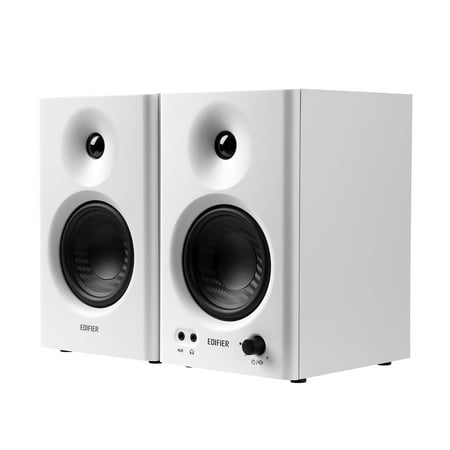
The Edifier MR4 takes the place of the BeBom SP20 from our earlier list. If you edit video, make music or just want accurate sound at your desk, these compact studio monitors are a great value.
Each speaker has a 4-inch woofer and a 1-inch silk dome tweeter in an MDF cabinet. Edifier rates them at 42 watts RMS total, with a frequency response of 60 Hz to 20 kHz.
You can switch between Monitor Mode for a flatter sound when you’re producing and Music Mode for more fun, everyday listening.
The front panel has a multi-function knob, an AUX input and a headphone jack, which is a nice touch for late-night sessions. On the back, you’ll find balanced TRS inputs and RCA inputs for audio interfaces and other gear.
They don’t have Bluetooth or USB audio, so you’ll connect them with a cable from your computer’s headphone jack or an audio interface. When we checked, the White finish was in stock on Edifier’s US store and Black was sold out.
Key Features
- 4-inch woofers and 1-inch silk dome tweeters
- 42W RMS total
- Monitor and Music modes
- Balanced TRS, RCA and AUX inputs
- Front-panel headphone jack
- Accurate sound for creators
- Headphone jack and AUX on the front
- Pro-style balanced inputs
- No Bluetooth or USB
- Black finish can be out of stock
10. Creative Stage Air V2

See the Stage Air V2 on Creative.com
The Creative Stage Air V2 replaces the VOTNTUT soundbar from our earlier list. It’s a compact under-monitor soundbar that instantly transforms your desktop or laptop audio for the better.
At about 16.1 inches long, it fits right under most monitors or off to the side of your laptop and frees up space on your desk. Creative rates it at 2 x 5 watts RMS and 20 watts peak.
Like many other desktop computer speakers, it has a plug-and-play setup. A USB-C to USB-A cable carries audio from your PC or Mac, and you can also connect over Bluetooth 5.3 or the 3.5 mm AUX input.
It works with a wide range of devices, including PCs, Macs, PS4, PS5, Nintendo Switch, phones and portable music players. You can even hook up a CD player through the AUX input.
A built-in 2,200 mAh battery gives you up to six hours of playback, so you can take it to another room or on a trip. If you have limited space or frequent travel plans, this might be the ideal solution for portable sound.
Key Features
- Compact 16.1-inch under-monitor soundbar
- 2 x 5W RMS, 20W peak
- USB audio, Bluetooth 5.3 and AUX-in
- Built-in battery with up to 6 hours of playback
- Works with PC, Mac, PlayStation and Switch
- Saves desk space
- Portable with battery power
- Three ways to connect
- Limited stereo separation in one bar
- Modest bass
How to Choose Computer Speakers
Desk space. Measure before you buy. Tiny speakers like the Creative Pebble V3 and Logitech S150 fit beside a laptop, and a soundbar like the Creative Stage Air V2 slides under your monitor. Bookshelf-style speakers like the Edifier R1280DBs and MR4 need more room but sound much bigger.
2.0 or 2.1. A 2.0 system is just a left and right speaker. A 2.1 system adds a subwoofer for deeper bass, like the Klipsch ProMedia Lumina, Logitech Z407 and Cyber Acoustics CA-3610. If you watch movies or play games, the extra bass makes a big difference. Some 2.0 speakers, like the Audioengine A2+ and Edifier R1280DBs, have a sub output so you can add one later.
Connections. USB speakers take their power and sound from one cable, which keeps things tidy. Bluetooth lets you stream from your phone, too. Optical and coaxial inputs, like on the Edifier R1280DBs, are handy if you also want to connect a TV or game console.
Power and sound quality. Higher wattage usually means more volume, but driver size and design matter just as much. RMS (continuous) power is more useful than peak power when you compare models.
What you’ll use them for. For video calls and background music, a budget USB pair is plenty. Gamers should look at the Razer Nommo V2 X for positional audio, and creators will appreciate the more accurate sound of the Edifier MR4.
Frequently Asked Questions
Are computer speakers better than laptop speakers?
Almost always. Built-in laptop speakers are tiny and often fire down into your desk. Even a budget pair of external speakers, like the Logitech S150 or Creative Pebble V3, uses bigger drivers and points the sound at you, so voices and music sound clearer and fuller.
Do I need a subwoofer with computer speakers?
Not for calls, podcasts or casual music. A subwoofer is worth it if you watch a lot of movies, play games or listen to bass-heavy music. You can buy a 2.1 system with a sub included, or choose speakers with a subwoofer output and add one later. Our guide to the best subwoofers can help.
Are USB speakers better than 3.5 mm speakers?
USB speakers are simpler, since one cable handles power and sound and they bypass your computer’s headphone jack. Speakers with a 3.5 mm or RCA input are more flexible, since you can plug them into phones, audio interfaces and other gear. Many current models, like the Pebble V3 and Stage Air V2, offer both.
Can I use computer speakers with a TV?
Yes, if the speakers have an input your TV supports. The Edifier R1280DBs has optical and coaxial inputs, and many TVs have a headphone or optical output. For a dedicated TV setup, a soundbar is usually a better fit. See our list of the best soundbars for TV-focused picks, and pair them with one of the best streaming sticks.
How many watts do computer speakers need?
For a desk where you sit about two to three feet away, you don’t need much. Around 10 watts RMS is plenty for most people, and 20 to 40 watts RMS gives you headroom to fill a small room. Compare RMS ratings rather than peak power, since peak numbers can make speakers sound more powerful than they are.
Summary
There are many options you can choose from when it comes to the best computer speakers.
For the best overall sound in a compact package, go with the Audioengine A2+ Gen 3. If you have the space, the Edifier R1280DBs sounds bigger and adds TV-friendly inputs. Want bass? The Logitech Z407 and Cyber Acoustics CA-3610 are budget 2.1 picks, and the Klipsch ProMedia Lumina is the premium choice.
On a tight budget, the Creative Pebble V3 and Logitech S150 are easy upgrades over laptop speakers. Gamers should look at the Razer Nommo V2 X, creators at the Edifier MR4, and anyone short on space at the Creative Stage Air V2.
To choose the best option for your office, consider your space first. Next, decide how important sound quality and bass are to you. Then, think about the look and feel. Finally, find out what kind of support and warranty are offered, just in case you have questions or issues.


